
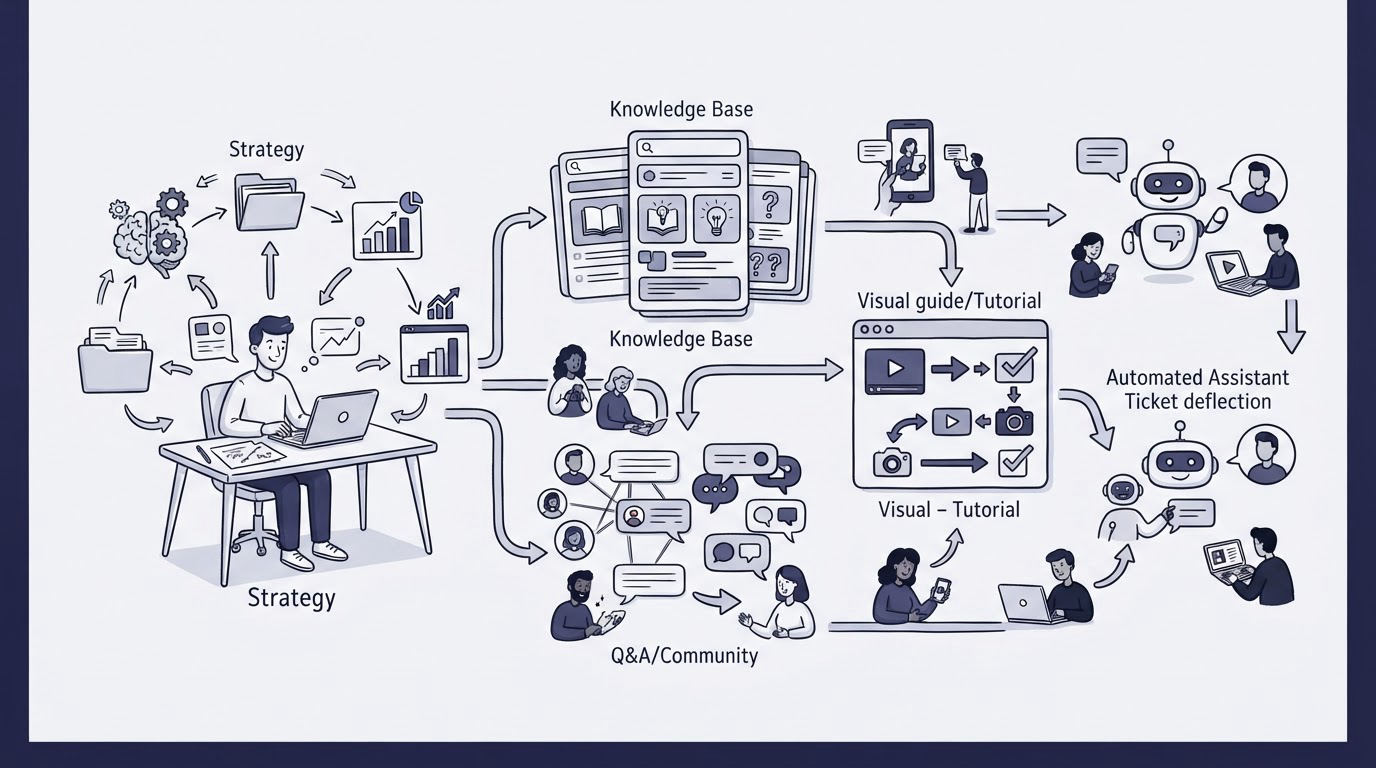
A customer reaches the billing page, cannot find an invoice, and opens chat with a question your team answered twice yesterday. Then a new user gets stuck during setup because the relevant guidance is buried in a broad help article. These are costly interruptions for the customer and the support team.
A strong self service customer support strategy gives people the answer at the moment and place they need it, while capturing the gaps that still create requests. Cajobo brings knowledge base content, live chat, and feedback together so SaaS teams can run that workflow in one place.
Quick answer: how to build self service customer support
Use this workflow to prevent common questions from becoming tickets:
- Export recent conversations and group them by the customer task that triggered each question.
- Create one searchable knowledge base article for each repeated, solvable task.
- Place links to the relevant article inside the product screen, email, or chat conversation where the question occurs.
- Add one-tap feedback to articles and key product pages to find weak answers and product friction.
- Review failed searches, low-rated articles, and repeat conversations every month, then improve the content or product flow.
Start self service customer support with real support demand
Begin with the conversations customers already create. Pull the last 90 days of chat and email requests, then tag each one by the underlying job: invite a teammate, change a plan, export data, locate an invoice, reset access, or configure an integration.
Avoid grouping by the wording of the question. “Where is my receipt?” and “How can I download an invoice?” belong in the same billing-document task. This approach produces a smaller, clearer article set and shows where a product screen needs better guidance.
Use this simple prioritization model:
| Question group | Customer impact | Frequency | Best self-service response | Owner |
|---|---|---|---|---|
| Download invoices | High | High | Billing article linked from billing settings | Support and finance |
| Invite teammates | High | Medium | Setup article plus in-product link beside the invite control | Product and support |
| Change account email | Medium | Medium | Account-settings article with security steps | Support |
| Export usage data | Medium | Low | Detailed article with export format examples | Product |
Consider a B2B SaaS product where support sees 18 weekly conversations about invoices. The team first publishes /help/download-invoices, explaining where invoices appear, who can access them, and how to update billing details. A week later, customers still ask from the billing screen because they never visit the help center. The team adds an “Invoices and receipts” link next to the invoice list. Article feedback then shows that customers are actually looking for tax details, so the article gains a short section covering tax invoices and available fields.
That sequence is the core operating model: support demand reveals the question, contextual help delivers the answer, and feedback exposes what remains unclear.
Build a searchable knowledge base customers can use
A knowledge base earns its place when customers can find an answer quickly and trust what they find. Organize categories around product tasks rather than internal departments. “Manage billing,” “Set up your workspace,” and “Use reports” describe customer goals clearly.
Give every article one clear job. An article titled “How to invite team members” should show the required role, the exact navigation path, what the invitee receives, and what to check if the invitation fails. Keep policy explanations, troubleshooting, and adjacent tasks in separate articles when they make the main flow harder to follow.
Search quality depends heavily on article titles and headings. Use the terms customers see in the product and use in support conversations. If the interface says “workspace,” write “workspace” in the article title. Add common alternatives naturally in the opening paragraph where they help searchers.
Google can surface useful help-center pages when they are accessible to crawlers and linked clearly. Follow Google’s guidance on creating helpful, reliable content and its SEO starter guide when you publish public support resources.
For a deeper content model, read Knowledge Base Software for SaaS: What to Include and How to Structure It. It covers categories, article templates, and ownership in more detail.
Write articles for completion, not page views
A useful support article lets the reader finish a task without opening another conversation. Start with the answer or action, then explain conditions that change the steps.
For the invoice example, the opening can say: “Go to Settings, choose Billing, then select an invoice to download the PDF.” Follow that with role requirements, invoice availability timing, and a direct path to support for account-specific billing issues.
Screenshots help when the interface is visually dense or labels are easy to miss. Refresh them after meaningful product changes. Outdated screenshots create hesitation at exactly the moment the article should reduce it.
Put help content where customers get stuck
A searchable help center handles customers who actively seek an answer. In-context help serves customers while they are already trying to complete a task. Use both.
Return to the invoice scenario. The billing article belongs in the knowledge base, but the highest-value link sits on the billing page beside invoices, payment method controls, and plan changes. Each link should describe the answer the person will receive, such as “Download invoices and receipts.”
Place contextual links at predictable friction points:
- First-use setup screens with several required fields
- Permission and role controls that affect access
- Billing, cancellation, and account ownership settings
- Empty states where users need to import, create, or connect something
- Error messages that have a known resolution path
Keep the link narrow. A generic “Help” label forces a customer to search again. A specific article link removes that extra step.
Live chat still has an important role. It catches urgent, account-specific, and confusing cases, while its transcript becomes research for improving self service. Set a response standard and route recurring questions back to the relevant article. Live Chat Software for SaaS Teams explains how to structure that channel without turning it into the default route for every question.
Use feedback to improve self service customer support
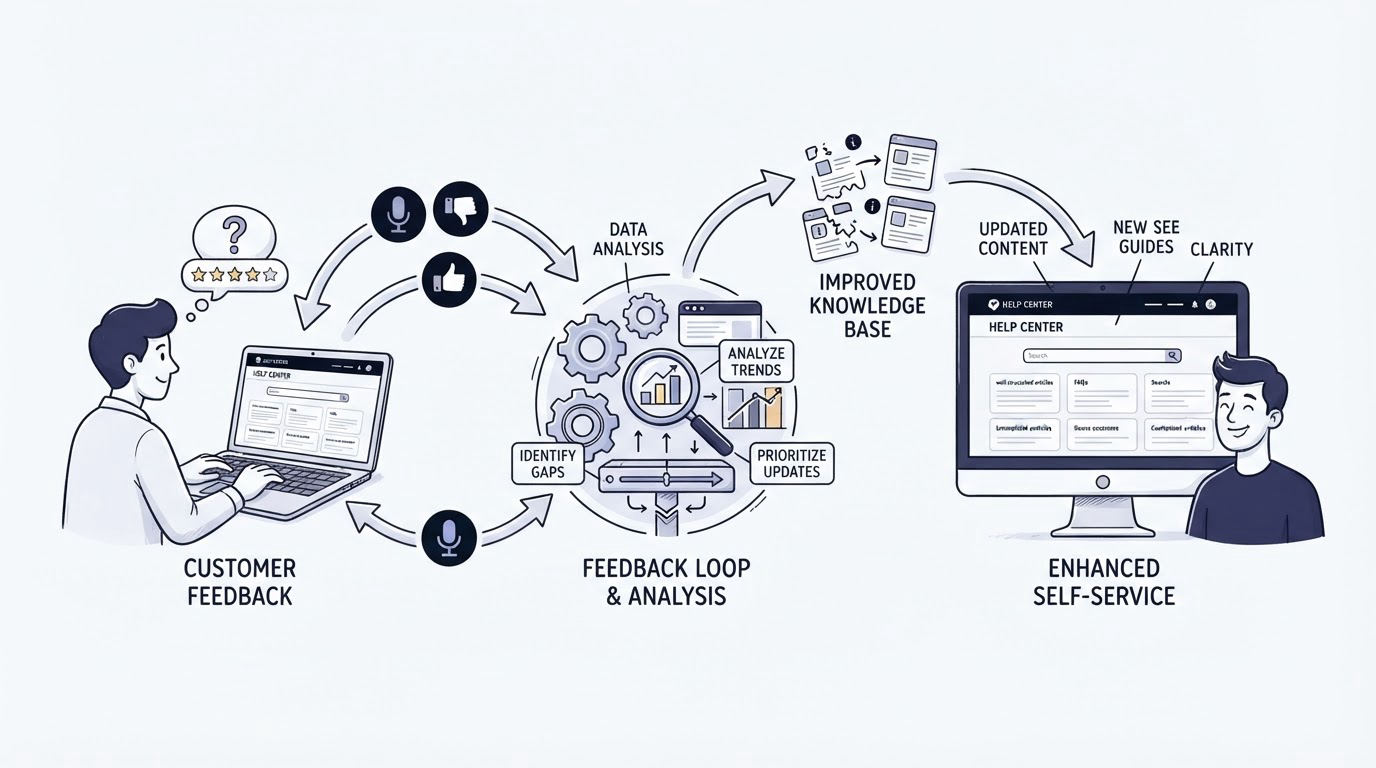
Publishing articles creates a starting point. Feedback tells you whether customers can actually use them.
Add a short, one-tap prompt at the end of each article, such as “Did this solve your problem?” Capture a follow-up comment when a person selects the negative response. This reveals missing prerequisites, ambiguous language, broken steps, and issues that require a product fix rather than another article.
The same principle applies inside the product. A lightweight feedback prompt on a setup or billing page can reveal frustration before it reaches chat. Keep prompts tied to a specific page or task so the feedback has useful context.
For the invoice article, suppose several readers select a negative rating and write that they need invoices before the payment clears. The support team now has a precise decision: explain invoice timing in the article, adjust the billing-page wording, or change the product experience if the current timing conflicts with customer needs.
Use feedback as an improvement queue, then close the loop by revising the article or assigning the issue to the right product owner. Learn more about gathering actionable signals in Customer Feedback Widgets: How to Collect Useful Feedback on Your Website.
How Cajobo supports the full self-service workflow
Teams can assemble this process with separate tools, spreadsheets, and manual handoffs. Cajobo is designed around the connected workflow: support conversations identify the recurring issue, help content answers it, and feedback shows whether the answer worked.
Start by publishing task-focused articles in the Cajobo Knowledge Base. Build categories that mirror the product and give each recurring support topic its own searchable destination.
Next, use Cajobo Live Chat for questions that need a person. When an agent sees the same issue again, they can use the conversation to identify weak wording, missing steps, or a missing article. The article link becomes a consistent response for future conversations.
Then collect article and page-level signals through Cajobo Feedback. Review comments alongside the original support themes. A negative article response about invoice timing carries far more value when the team can connect it to the billing task and update the relevant resource.
This shared workflow reduces context switching for a small SaaS team. It also gives product, support, and success teams a common view of where customers lose momentum. For an overview of the combined setup, see the Cajobo customer support platform.
Review the self-service system every month
Assign an owner who can make editorial decisions and coordinate with product teams. Without ownership, articles slowly drift away from the interface and unresolved patterns remain hidden in conversations.
Run a monthly review with three inputs: the highest-volume support topics, low-rated articles and feedback comments, and recent product changes. For each item, choose one action: update an article, add a contextual link, improve the product flow, train the support team on a response, or retire obsolete content.
Track a practical set of measures over time: repeat contact for the same issue, article helpfulness responses, search terms that fail to produce a useful result, and conversation volume by task. Treat these as diagnostic signals rather than isolated targets. A drop in invoice chats after a help update is useful only when customers can still complete the task successfully.
A common failure mode appears when teams publish broad articles such as “Billing FAQ” and stop there. Customers scan a long page, miss the relevant section, then contact support anyway. Split broad content into task-specific pages and link each one from the relevant product location.
Another failure mode is using feedback as a collection box with no review rhythm. Set an owner, a review date, and a decision for every meaningful pattern. How to Create a Knowledge Base That Reduces Customer Support Tickets offers a practical process for keeping those improvements moving.
FAQ
What is self service customer support?
Self service customer support helps customers solve routine problems independently through resources such as knowledge base articles, in-product guidance, searchable help content, and feedback-enabled support experiences. For SaaS, it works best when help appears during the task where a customer needs it.
How do I know which help articles to write first?
Start with the most frequent questions that have a stable answer and a clear resolution path. Recent chat transcripts, emails, failed searches, and onboarding feedback provide the strongest source material. Prioritize issues that interrupt setup, billing, access, and core product use.
Can self-service support replace live chat?
Live chat remains valuable for urgent problems, account-specific questions, and complex troubleshooting. Use self-service resources to resolve repeatable tasks, then use live conversations to identify the next improvements for your help content and product experience.
How often should a SaaS knowledge base be updated?
Review it monthly and after every meaningful product release, pricing-policy update, permission change, or interface redesign. Update high-traffic articles first, especially content connected to onboarding, billing, and account access.
What feedback should appear on a help article?
A simple helpfulness question and optional comment field are usually enough. Ask whether the article solved the visitor’s problem, then review negative responses for missing steps, unclear terminology, and product issues. Keep the prompt brief so it does not interrupt the reader.
Build the first version from your most repeated support tasks, link each article where the task occurs, and use feedback to improve the next version. Teams that need knowledge base, live chat, and feedback in one support workflow can explore Cajobo at cajobo.com.