
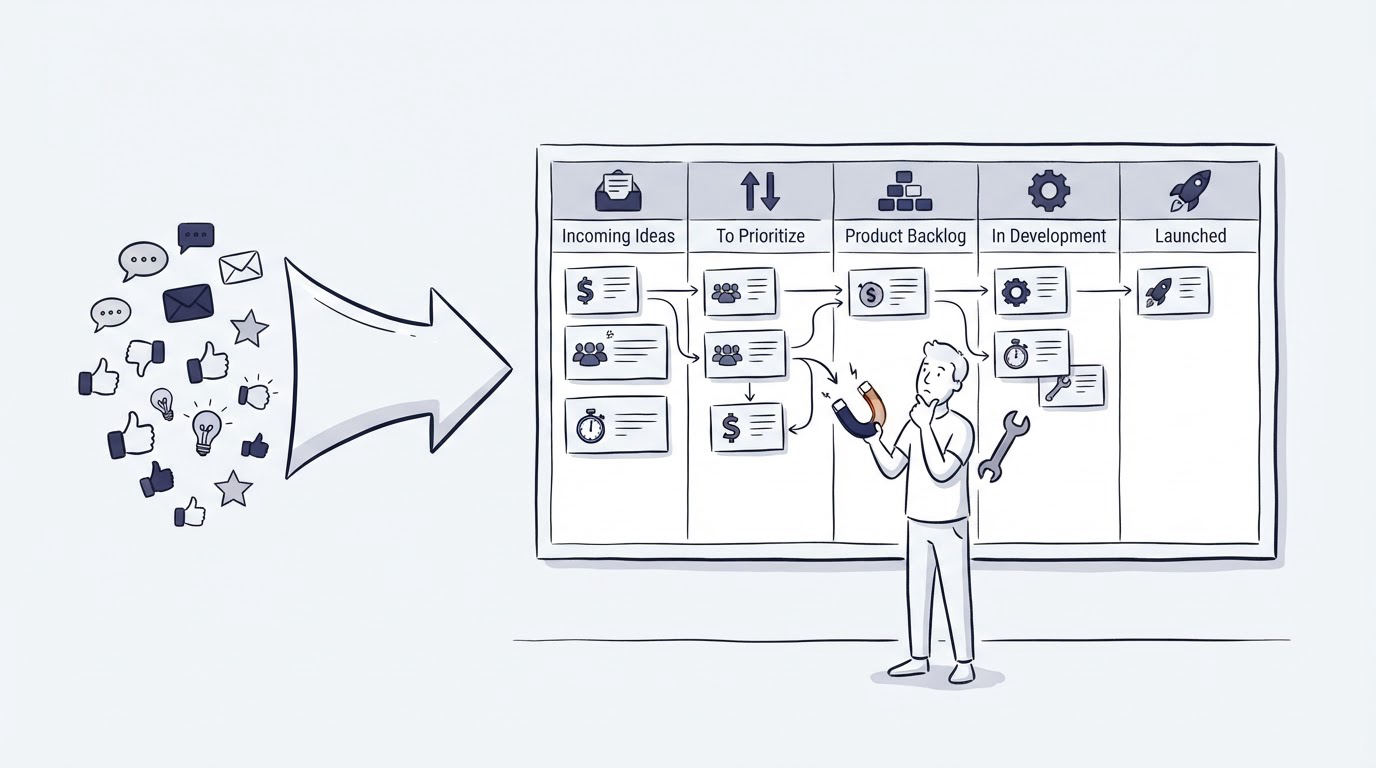
Feature requests often arrive through chat conversations, support emails, sales calls, and scattered documents. When each team records them differently, product managers lose the customer context behind the request and customers receive vague updates.
A customer feedback board gives every request a visible home, combines duplicate demand, and creates a repeatable path from submission to product decision. Cajobo can place that workflow alongside the support conversations and help content where customers already ask for help.
Quick answer: how to set up a customer feedback board
- Define the decisions the board will support and the customer groups who can submit requests.
- Create focused feedback categories and direct every intake channel to the relevant board.
- Standardize submissions, merge duplicates, and retain the original customer context.
- Add voting plus business, support, and product signals to each request.
- Score requests on a regular cadence with a simple, shared prioritization model.
- Set clear statuses and publish product updates customers can follow.
- Review the board after every planning cycle and close the loop with contributors.
How to define the purpose of your customer feedback board
Start with one decision the board must improve: choosing what enters the next product cycle. This keeps the board focused on product requests rather than becoming a second support queue.
For example, consider a B2B reporting SaaS. Customers submit requests for scheduled PDF exports, custom dashboard colors, and additional data connectors. The product team creates a board at app.example.com/feedback with three categories: Reporting, Integrations, and Account administration. A billing question or an outage report goes to support instead.
Set submission access before launch. Open boards encourage a broad volume of ideas, while authenticated boards tie requests to accounts, plans, and usage patterns. An authenticated approach works well for a SaaS product because a product manager can see whether a request comes from a trial user, a long-term administrator, or several users at the same account.
Ask for only the fields that inform a decision. Long forms lower submission quality and completion. A title, a short description, the problem being solved, and optional screenshots usually provide enough material for an initial review. Build accessible fields and clear labels using the principles in the W3C guidance on accessible forms.
How to collect requests for a customer feedback board
Customers should reach the board from the places where product friction occurs. Add a feedback link in the application navigation, include it in relevant support replies, and share it after customer interviews when a participant raises a repeatable need.
A website feedback widget can capture ideas while the experience is fresh. For practical placement and question design, see how to collect useful feedback on your website. Keep the widget prompt specific, such as “What would make report creation faster?” A broad “Share feedback” prompt produces more varied input and requires heavier triage.
The reporting SaaS in this example adds a feedback entry point on the Reports page. Within two weeks, 18 people ask for email delivery of scheduled reports. Seven use different wording, including “send monthly reports automatically” and “schedule report emails.” The board gives the team one place to combine this demand.
Support agents also need a clean handoff. When an agent hears a feature request during a conversation, attach the customer’s use case to an existing post or submit it with the customer’s permission. A shared inbox workflow helps agents preserve the conversation details that explain urgency, affected workflows, and temporary workarounds.
How to organize requests and merge duplicates
Treat each board post as a problem record, rather than a literal promise to build the exact solution proposed. Customers describe the outcome they want through the language of their own workflow. Product teams need to preserve that language while grouping related demand.
Use a short triage routine several times each week. Read new submissions, assign a category, search for an existing request, and merge closely related entries. Choose the clearest title for the parent post. Add the merged requester's vote and customer context to the parent, then leave a short note directing the customer to the tracked post.
For the reporting SaaS, the team merges “send reports by email,” “automated report delivery,” and “monthly PDF scheduling” into “Schedule recurring report delivery.” A request for automated exports to cloud storage remains separate because it involves a different workflow and technical scope.
Use consistent tags for customer segment, affected area, and request type. Tags should answer retrieval questions during planning, such as “Which requests come from account administrators?” or “Which ideas affect report delivery?” Avoid a large tag library. Ten disciplined tags are easier to use than 80 overlapping labels.
| Signal on the request | What it reveals | How to use it in prioritization |
|---|---|---|
| Unique voters | Breadth of visible demand | Compare demand across similar requests |
| Account and role | Who experiences the problem | Weight strategic customer segments appropriately |
| Support frequency | Repeated operational friction | Estimate ticket deflection and service effort |
| Revenue or renewal context | Commercial urgency | Involve sales or customer success in the decision |
| Product effort and risk | Delivery cost and technical exposure | Sequence work realistically |
| Linked feedback comments | The reason behind the request | Validate the underlying job to be done |
How to prioritize customer feedback board requests
Votes are a useful signal, yet they only show one dimension of demand. A request from 40 individual users may deserve attention, while a request from three administrators at key accounts may carry a larger workflow impact. Give the product team a shared scoring method so decisions stay explainable.
Use a lightweight score during planning: rate reach, customer impact, strategic fit, confidence, and effort on a 1 to 5 scale. Keep the formula simple enough to apply consistently. For example, the reporting SaaS gives recurring report delivery high reach because 18 customers requested it, high impact because teams run reports monthly, and moderate effort after engineering identifies an existing scheduling service that can be extended.
The team gives custom dashboard colors a lower priority. It has six votes and a clear user preference, yet it has limited effect on reporting completion, retention, or support volume. The request stays visible with a status that explains it remains under consideration.
Record the reason for every major priority decision in the request itself. This creates useful history when the same idea returns next quarter, when a new product manager joins, or when a customer asks why a high-vote request has not appeared in the roadmap.
Protect feedback data as you collect it. Store only the account and contact information needed for follow-up, define access for internal reviewers, and set retention practices with the NIST Privacy Framework as a useful reference.
How Cajobo supports the customer feedback board workflow
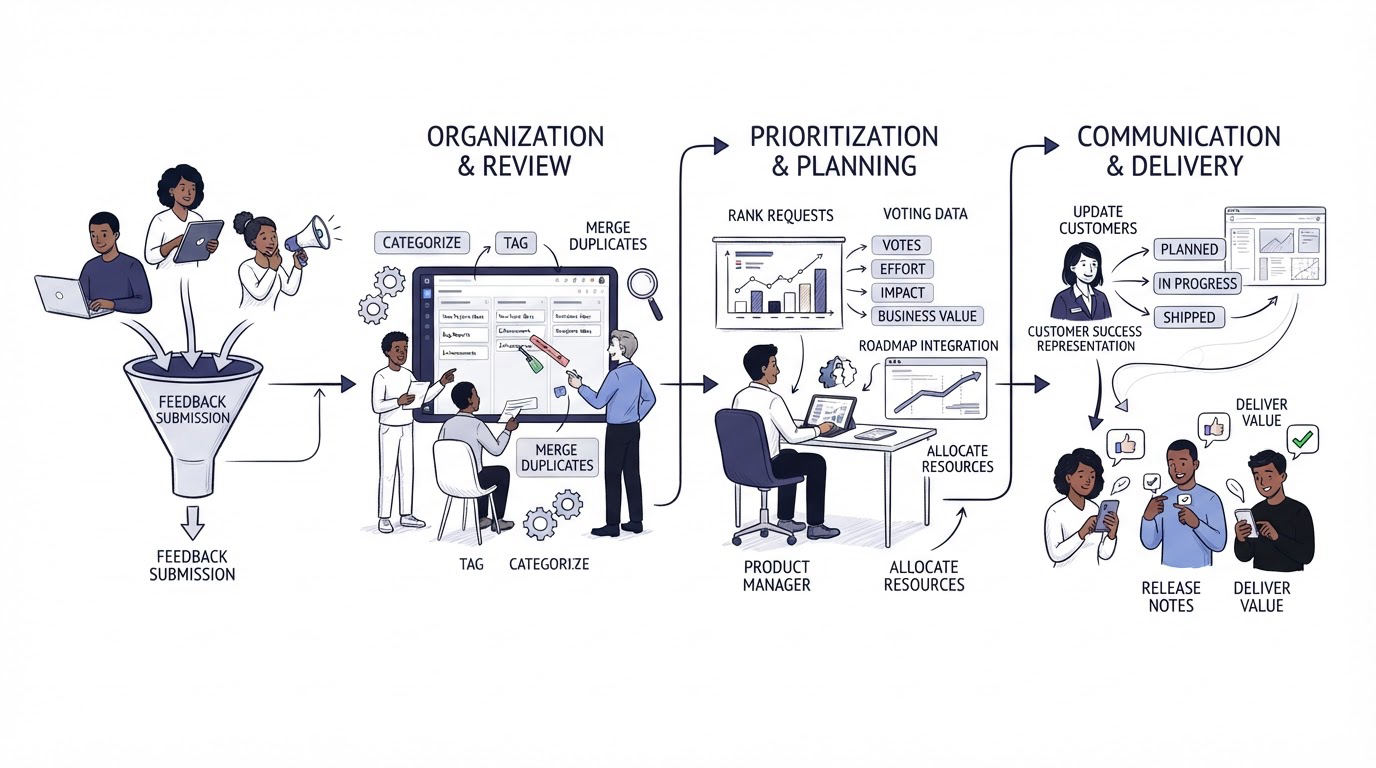
A feedback board works best when product input stays close to the customer conversations that create it. Cajobo brings feedback together with live chat and knowledge base content, which reduces the manual handoffs between support and product work.
Create a focused board for a product area, then direct customers from a support conversation or in-product prompt to that board. As submissions arrive, review titles and descriptions, group closely related requests, and keep the main request as the reference point for demand. Add the practical context from support, such as the affected report type or the customer’s current workaround.
During planning, review the grouped requests with product, support, and customer-facing teams. Use the visible demand alongside product effort and company priorities. Then update each request with a status that reflects the current decision: reviewing, planned, in progress, or complete.
Customers gain a clear destination for ideas and updates. Support agents gain fewer repetitive “is this planned?” conversations. Teams that want the broader support setup can also review the Cajobo customer support platform and the dedicated feedback workspace.
Using feature voting and a public roadmap for product planning
Feature voting works well when customers can see the existing requests before creating a new one. It channels demand toward shared posts and gives product teams a faster view of recurring needs. A public roadmap extends that visibility by showing which validated requests have reached planning or delivery.
For a team that needs dedicated feature request management software, Upvoty provides feature voting and public roadmap tools that help product teams collect ideas, consolidate demand, and share progress with customers. This fits a common situation: a product manager has 60 requests across support notes and interview documents, then needs one public place where customers can vote on the same underlying request and follow its status.
Set expectations in the board description. Explain that votes inform planning, product decisions also account for customer impact, technical feasibility, and strategic direction, and each request receives a status update when a decision is made. Customers respond far better to a clear process than to silent vote counts.
For a deeper process on connecting this work to visible planning, read how to use a public product roadmap.
How to publish updates from your customer feedback board
Statuses turn the board into a communication channel. Use a small, stable set that customers can understand quickly: Under review, Planned, In progress, Complete, and Closed. Define each status internally so every team member uses it the same way.
When the reporting SaaS marks recurring report delivery as Planned, the product manager posts a concise update: “We are designing monthly and weekly email delivery for saved reports. The first release will support PDF attachments. We will share timing after technical planning.” This tells customers what is being explored without creating a deadline that has not been approved.
When work ships, link to the release note or knowledge base article that explains how to use it. A well-structured help center reduces the follow-up questions that often arrive after a feature release. See how to create a knowledge base that reduces support tickets for the content structure behind that handoff.
Close requests sparingly. Use a closed status when the problem has been addressed another way, the request falls outside product direction, or the original request has become obsolete. Add a respectful explanation. Silence creates repeated submissions and weakens trust in the board.
Common customer feedback board mistakes
A board loses value when it becomes an unreviewed list of ideas. The following problems create the most avoidable confusion:
- Treating vote totals as the entire prioritization model.
- Allowing duplicate requests to remain separate for months.
- Mixing support incidents, bug reports, and feature ideas in one queue.
- Publishing ambitious delivery dates before engineering planning.
- Leaving completed requests without a release update.
- Collecting customer details without a clear follow-up purpose.
Set a calendar reminder for triage twice each week and prioritization before each planning cycle. Assign a named owner for status updates. These small operational commitments keep the board credible.
FAQ about customer feedback boards
What should a customer feedback board include?
Include focused categories, a simple submission form, voting or another demand signal, customer context, internal tags, a small set of public statuses, and a defined review cadence. The most useful board also gives customers a way to search existing posts before submitting a new one.
Should every customer be able to vote on feature requests?
Open voting is useful for products with a broad user community. Authenticated voting gives SaaS teams stronger customer context and reduces low-quality submissions. Choose the approach that matches your product audience, privacy requirements, and planning process.
How often should teams review a feedback board?
Triage new submissions two or three times per week. Review priorities before each product planning session. Update public statuses whenever a request moves into planning, development, release, or closure.
How do you handle a request with many votes that will not be built?
Explain the decision in the request status and describe the constraint in plain language. Where an alternative workflow exists, link to the relevant product guidance or help article. A clear answer preserves more trust than leaving a popular request untouched.
Can a customer feedback board reduce support tickets?
It can reduce repeated product-request conversations when customers can find the existing request, add their voice, and see progress. Pair the board with clear support routes for account issues, bugs, and urgent incidents so agents can route each conversation to the right place.
A customer feedback board earns trust through regular review and visible decisions. Start with one product area, publish the intake route, and maintain status updates through the next planning cycle.