

A customer sends a chat message, then follows up because nobody has replied. Two teammates spot it at the same time and both answer. The customer gets conflicting guidance, while a third request waits unseen in an individual inbox.
Shared inbox software gives a small team one operational view of incoming support conversations. Cajobo brings live chat, self-service content, and feedback signals into a connected support workflow, so the team can route each conversation to a clear owner and turn repeated questions into useful help content.
Quick answer: how shared inbox software speeds up support
Use this workflow to improve response times:
- Route every support channel into one shared team inbox.
- Set simple ownership rules by topic, customer type, or urgency.
- Assign each new conversation to one person and make the assignee visible.
- Use statuses to separate new, active, waiting, and resolved requests.
- Build saved replies and knowledge base links for repeat questions.
- Review unassigned, aging, and reopened conversations every day.
- Turn recurring questions and low feedback scores into support improvements.
Why shared inbox software improves customer support response times
Fast support depends on a team seeing the same queue and acting from the same context. When messages arrive in personal email accounts, browser tabs, or separate chat tools, someone has to decide who owns each request before the customer receives help. That manual coordination adds delay.
A shared customer support inbox changes the daily operating model. Everyone can see whether a conversation is new, who is handling it, and where the last reply left off. Teammates can step in during absences, hand off technical cases, and avoid sending a second answer to a customer who already has an owner.
The main gains come from four controls:
- Visibility: New conversations appear in a queue the whole team can monitor.
- Ownership: Each request has a named person responsible for the next action.
- Context: Prior messages, customer details, and internal notes stay with the thread.
- Repeatability: Common answers use approved wording, links, and troubleshooting steps.
For small teams, these controls often matter more than complex automation. A queue of 15 clearly owned conversations is manageable. A queue of 15 messages scattered across individual accounts produces uncertainty and follow-up work.
How to set up a shared support inbox, step by step
Start with the actual paths customers use to ask for help. For many SaaS teams, that includes website chat, a support address, and requests from product users. Keep the first setup small enough that the team will follow it every day.
1. Bring customer conversations into one queue
List each channel and decide where its messages should land. The aim is one place for the support team to triage new work, even when customers start conversations from different entry points.
For website chat, make the entry point easy to find and set expectations about availability. A visitor who sees a response window such as "Replies during business hours" can decide whether to wait, leave contact details, or use self-service documentation. Cajobo's Live Chat is designed to make chat part of a wider support workflow rather than an isolated pop-up.
Keep identity information with the conversation where possible. A known user email, account plan, recent page viewed, or product area helps the assignee begin diagnosis sooner. Limit collected fields to what the team needs to resolve the request. The ICO's guidance on data minimisation offers a useful standard for keeping support forms proportionate.
2. Create a small set of routing rules
Use categories your team can apply quickly. Good starting categories include billing, account access, bug report, pre-sale question, and how-to guidance. Give each category a primary owner and a backup person.
Avoid creating a long tree of rules before the team has real queue data. Early over-automation sends unusual cases to the wrong person and hides the reason for the delay. Begin with two or three routing rules, then review where manual reassignment occurs.
3. Assign one clear owner to every active conversation
A conversation needs one person responsible for the next customer-facing action. Other teammates can contribute notes, investigate an issue, or review a draft, yet the assignee remains accountable for moving the thread forward.
Set a practical assignment habit: the person triaging the inbox assigns a conversation immediately, or claims it themselves. Leave a short internal note when handing off a case: state what the customer needs, what has been checked, and what reply is due next.
4. Use statuses that drive the next action
Statuses should represent operational reality. A compact system works well:
| Status | Meaning for the team | Next action |
|---|---|---|
| New | Nobody has reviewed the message | Triage and assign it |
| Open | An owner is actively working on it | Reply, investigate, or ask a focused question |
| Waiting on customer | The team needs information from the customer | Set a follow-up reminder |
| Waiting internally | Another teammate or technical team must act | Add an owner and review date |
| Resolved | The customer has received the final answer | Watch for a reopen or feedback signal |
Use a separate status for each type of waiting. It prevents stalled threads from blending into work that is actively being handled.
5. Give agents answers they can use quickly
Saved replies help with routine confirmations, account questions, and troubleshooting instructions. They need regular editing. A stale template can create extra replies when it references an old interface or process.
For questions that need more than a few sentences, link customers to a well-structured article and stay available for the account-specific part of the issue. Learn how to create articles that actually reduce repeat requests in How to Create a Knowledge Base That Reduces Customer Support Tickets. Keyboard access also deserves attention when offering website chat. The W3C WCAG 2.2 guidance covers keyboard-operable functionality and clear focus indicators that affect support widgets.
6. Review the queue before it becomes a backlog
Export or review the last 90 days of conversations first. Look for requests with no assignee, threads waiting longer than your internal target, frequent reassignments, and reopened tickets. These patterns show where response time is being lost.
Run a short queue review at the start and end of each business day. A five-minute review catches conversations that slipped through handoffs, while a weekly review reveals patterns that need a process or product fix.
A worked example: routing support at Northstar Metrics
Consider Northstar Metrics, a fictional three-person analytics SaaS team. Its website has a /pricing page, a logged-in /app/reports area, and a contact address used for account questions. Before adopting a shared process, Maya handles most chat messages, Dev answers billing emails, and Rowan investigates product issues.
At 9:12 a.m., a customer writes through the chat widget from /app/reports: "My scheduled report did not arrive." Maya sees the message and starts checking the account. At 9:15, Rowan opens the same chat thread from another tab and begins drafting an answer. At 9:18, the customer also emails support with the same question.
A shared inbox workflow prevents this from multiplying into three separate pieces of work:
- The chat and email conversation are grouped or linked during triage.
- The request is tagged as a report-delivery issue and assigned to Rowan.
- Maya adds a note that the customer has already supplied the affected report name and delivery time.
- Rowan checks the delivery settings and sends the single customer-facing reply.
- The team records the cause if the question appears again, then creates a knowledge base article for report delivery checks.
The earlier process failed at ownership. Both teammates had enough information to act, yet neither could see who held responsibility for the reply. The revised process makes Rowan's name, the status, and the latest context visible from the start.
Use shared inbox data to reduce future support demand
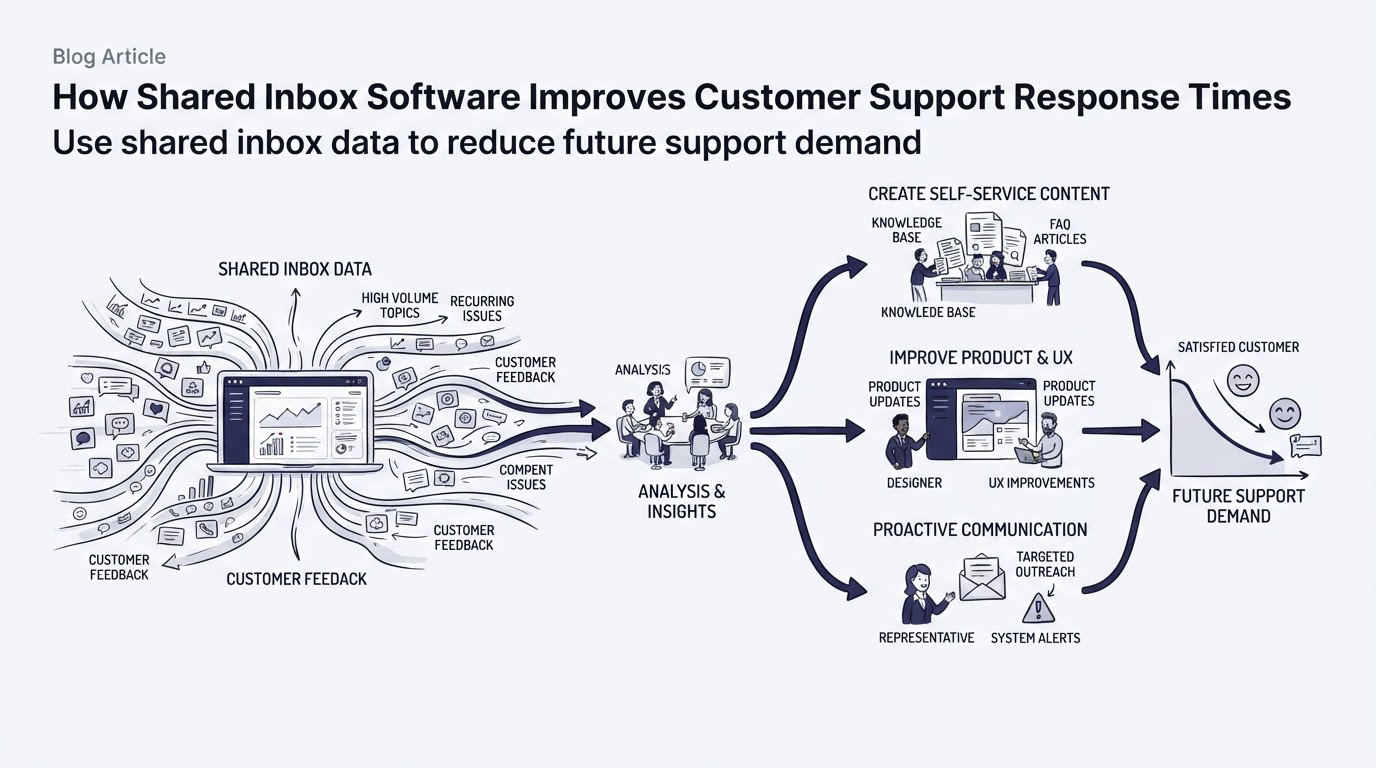
A shared inbox is also a source of product and content evidence. Repeated conversations often point to unclear onboarding, missing documentation, confusing labels, or a feature customers expect to work differently.
Tag recurring themes consistently for a month. Then compare the tags with feedback collected after support interactions or on relevant product pages. A customer who resolves a ticket yet leaves negative feedback may have received a correct answer after too much effort.
Cajobo's approach connects this loop across chat, knowledge base, and feedback. An inbox trend can lead to a new help article, while a low feedback score can reveal whether that article or support process solved the underlying friction. See practical ways to gather that signal in Customer Feedback Widgets: How to Collect Useful Feedback on Your Website.
How Cajobo supports a shared inbox workflow
Small teams often start by coordinating manually in chat and email. That approach holds together for a while, then handoffs and repeat questions consume more of the day. Cajobo brings the pieces of this workflow together in one support setup.
First, add live chat where customers need help, such as product pages or the signed-in application. Incoming questions enter the team's support flow, where they can be reviewed and assigned instead of remaining tied to one person's browser session.
Next, identify the questions that appear repeatedly. Create or improve the relevant articles in the Knowledge Base, then use those resources during replies. An article covering report delivery, for example, can explain the standard checks while the conversation handles the customer's specific account details.
Then collect feedback after the interaction or near the affected part of the product with Feedback. Review comments and scores alongside inbox themes. If customers keep asking the same question after an article is published, revise the article, the interface, or the routing process.
This connected workflow gives a small team a practical improvement cycle: conversations reveal demand, help content handles repeat questions, and feedback tests whether the change reduced customer effort. For a broader look at the components, read Cajobo Customer Support Platform: Live Chat, Knowledge Base, and Feedback in One Tool.
Common shared inbox mistakes that slow teams down
The most common mistake is treating assignment as optional. When a conversation has several watchers and no owner, each person assumes somebody else will reply. Make unassigned messages an exception that the team clears during every queue review.
Another problem is using tags as a substitute for ownership. Tags describe the request. An assignee drives the next action. Keep both fields, and teach the team their separate jobs.
Teams also close conversations too early. A status of resolved should mean the customer has a usable answer or the team has documented the next follow-up. For issues waiting on an engineering fix, keep the conversation in an internal-waiting state and assign someone to update the customer.
Finally, measure more than the first reply. A fast initial response that creates four extra messages can increase workload for everyone. Track reassignment, reopen patterns, and the questions that keep returning. For help choosing a broader support setup, compare the decision factors in Live Chat vs Help Desk: Which Support Model Fits?.
FAQ about shared inbox software
What is shared inbox software?
Shared inbox software is a team workspace for customer conversations. It lets multiple support teammates view incoming messages, assign an owner, track status, and keep customer context in one thread.
How does a shared inbox prevent duplicate replies?
The team can see when a conversation has an assignee, an active status, or a recent reply. Set a rule that the assignee sends the customer-facing response unless they explicitly hand the thread to someone else.
Can a small team use a shared inbox with live chat?
Yes. A shared inbox is especially useful with live chat because several teammates may be online at once. Route chat requests into the same review process as other support conversations, assign ownership quickly, and save common answers for frequent questions.
Which metrics should a small support team review?
Review time to first response, time to resolution, unassigned conversation count, reassignment frequency, reopened conversations, and recurring topic tags. Pair those measures with customer feedback to see whether fast handling also produced a satisfactory outcome.
When should we add a knowledge base to a shared inbox process?
Add articles as soon as the team sees the same how-to question several times. Start with high-volume issues that have a stable answer, then link the article from relevant replies and improve it when customers ask follow-up questions.
A shared inbox becomes valuable when the team commits to visible ownership, disciplined statuses, and regular queue reviews. Set up those habits first, then use Cajobo to connect customer conversations with knowledge base content and feedback that improves the next response.