
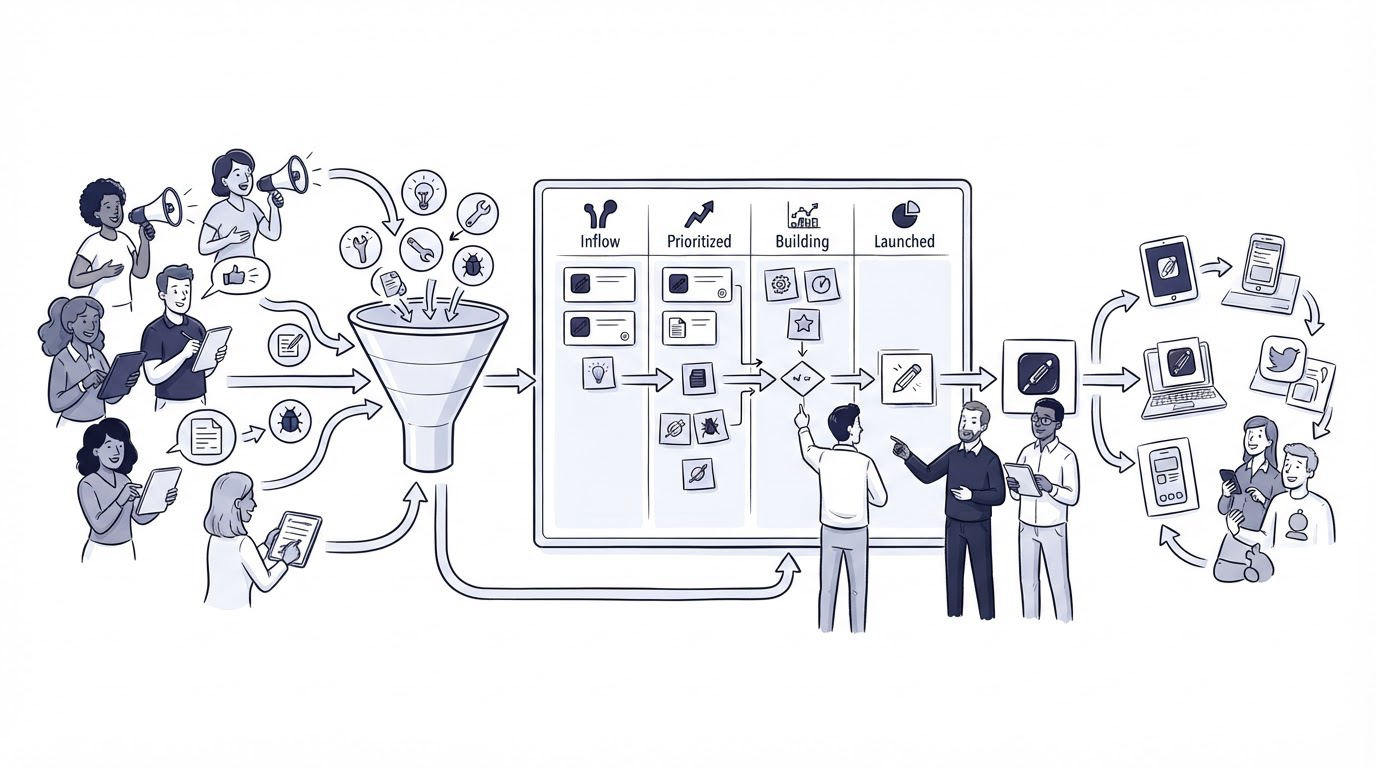
A feature request arrives in live chat, another appears in a support email, and three more sit in a feedback form with slightly different wording. Without one process, the team ends up planning from the loudest conversation or the most recent request.
A public product roadmap gives SaaS teams one visible place to collect demand, explain decisions, and show progress. Cajobo is especially useful when requests originate across support and feedback touchpoints, because the product team can retain the customer context behind each idea.
Quick answer: how to run a public product roadmap
- Capture feature requests wherever customers already contact your team, then record the customer, account context, and problem.
- Merge duplicate requests into one clear problem statement and tag it by product area, audience, and use case.
- Prioritize requests using evidence such as affected customers, strategic fit, effort, risk, and confidence.
- Publish the selected items with plain-language statuses, scope boundaries, and a way for customers to follow updates.
- Update each item as work progresses, then tell every interested customer when the outcome ships.
How a public product roadmap improves product decisions
A roadmap earns trust when customers can see that their input reaches a real decision process. It also gives product, support, and sales teams a shared answer when someone asks whether a capability is planned.
The key unit of work is the customer problem, rather than the first feature label attached to it. “Add Google Calendar sync” can mean several different needs: reading calendar availability, creating events, editing existing events, or syncing in both directions. Those paths carry very different engineering and privacy implications.
Use a concrete status vocabulary and apply it consistently. A useful set is Under consideration, Planned, In progress, Shipped, and Closed. Each label should describe the current decision state. Customers can then interpret the roadmap without trying to infer meaning from a vague “coming soon” badge.
A public roadmap also creates a feedback loop for planning. Votes, comments, and linked support conversations reveal demand patterns. Product judgment still sets direction, yet those decisions rest on a clearer record of who experiences the problem and why.
How to collect requests for a public product roadmap
Start collection at the moments customers already describe friction. These typically include support conversations, website feedback forms, account review calls, onboarding notes, and satisfaction responses.
Ask for the problem before asking for a proposed feature. A short form can prompt customers to explain what they were trying to accomplish, where they got stuck, and how often the issue occurs. That context separates a broad workflow gap from a preference about button placement.
For example, imagine a scheduling SaaS with a public page at /roadmap. A customer visiting /integrations/google-calendar asks for “calendar sync” through a support conversation. The support agent records that the customer needs to block booking slots when a consultant has a personal event. A second customer requests the ability to create meeting events after a booking.
Both comments initially look like one request. They solve different jobs. The first concerns availability protection. The second concerns event creation. Combining them would produce a misleading vote count and an unclear promise.
Send each conversation into a feedback record with the original wording and a short internal summary. Keep a link to the source conversation where your process allows it. Agents can then answer future follow-ups with the same context, and product managers can inspect the evidence behind demand.
A customer feedback widget helps gather requests while a visitor is already viewing a relevant page. For richer issues, let the customer attach detail through the normal support route instead of forcing every request into a short form.
How to organize customer requests before publishing them
Create one canonical feedback item for each distinct problem. Give it a customer-facing title that describes the result, such as “Prevent bookings during busy calendar events,” rather than “Google sync improvements.” Add an internal description with examples, linked requests, constraints, and any discovery notes.
Use a small, stable tag set. Product area, customer segment, and request type are usually enough. Too many tags turn triage into clerical work and reduce consistency.
For the scheduling SaaS example, the team creates two items:
- Prevent bookings during busy Google Calendar events
- Create Google Calendar events from confirmed bookings
The team links both items to a broader “Google Calendar integration” theme for internal planning. Customers vote on the outcome that matches their need, while the product team can still evaluate the shared technical dependency.
Privacy deserves attention before a request becomes public. Remove names, account details, contract references, screenshots with personal information, and sensitive operational details from the public description. The NIST Privacy Framework provides a useful basis for building privacy controls around how customer information is collected and shared.
How to prioritize a public product roadmap without letting votes decide everything
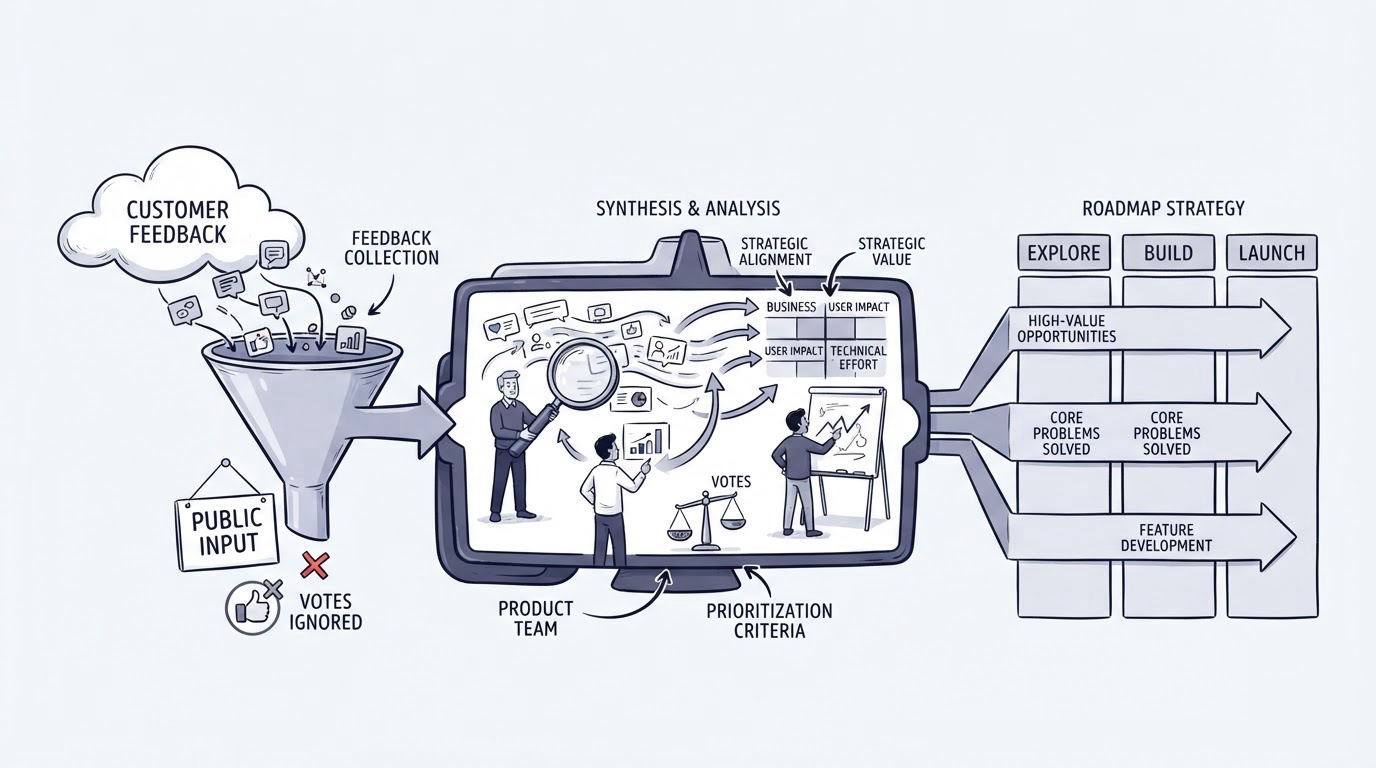
Votes are one signal. A request from many users can be valuable, while a request from one key account can reveal a serious workflow gap. Product decisions need both demand and judgment.
Score each candidate against a consistent set of questions. Consider the number and type of affected customers, the severity of the underlying problem, fit with product strategy, implementation effort, dependencies, security or compliance impact, and confidence in the evidence.
| Decision factor | What to examine | Example for calendar availability |
|---|---|---|
| Customer impact | Who experiences the problem and how disruptive it is | Consultants lose usable time when personal events remain bookable |
| Evidence quality | Whether requests include a repeatable use case | Support conversations identify the same availability workflow |
| Strategic fit | Whether the work supports the product's intended customer | The product serves service businesses that schedule client appointments |
| Effort and dependency | Engineering scope, third-party permissions, and maintenance | Read access and recurring-event handling require careful design |
| Risk | Privacy, reliability, and support implications | Calendar data needs clear permissions and predictable failure handling |
Use the score to drive a discussion, then record the decision and its rationale. A score alone cannot resolve competing strategic bets. It can expose unsupported assumptions before they become commitments.
In the example, the team chooses availability blocking first because it solves the scheduling failure customers described. Event creation moves into consideration until discovery confirms the desired behavior for cancellations, reschedules, and multiple calendars. The public roadmap reflects those separate decisions.
Avoid publishing a large “planned” list. A long list creates expectation debt. Customers may read any visible item as a delivery promise, particularly when dates appear beside it. Publish a smaller set of active priorities and keep the rest in an evaluated backlog with clear language.
How to communicate a public product roadmap clearly
Every visible roadmap item needs three pieces of information: the customer outcome, the current status, and the limits of the current commitment. Plain wording protects customers from guessing at scope.
For instance, the roadmap item might say: “We are building a way to prevent appointment bookings during busy Google Calendar events. The first release will focus on availability checks. Event creation after booking remains under evaluation.” This gives customers a usable expectation without exposing every internal task.
Add a follow option so interested customers receive updates as the item changes. When a request moves from consideration to planned, publish a short note describing the decision. When it reaches in progress, share a meaningful milestone rather than routine engineering activity. After release, link to release notes or documentation that explains how to use it.
Accessibility belongs in the publication workflow as well. Status labels need text, color contrast, and predictable interaction patterns. The W3C Web Content Accessibility Guidelines 2.2 provide practical criteria for making status indicators and interactive feedback controls easier to use.
Keep dates selective. Dates work well for firm launches, beta windows, or deprecation milestones. For early discovery and uncertain dependencies, communicate the next decision point instead. “Evaluating the calendar provider requirements this quarter” sets a clearer expectation than an unsupported launch month.
How Cajobo connects support feedback to a public product roadmap
Running this workflow manually often means copying requests among chat transcripts, inboxes, spreadsheets, and roadmap tools. Cajobo can reduce that handoff work by keeping customer communication and feedback collection close together.
A typical workflow starts when a visitor raises an issue through Live Chat or submits an idea through the Feedback area. The support team captures the request in the customer’s own words and adds the use-case detail gathered during the conversation.
Next, the product owner groups matching requests into one feedback item and checks the associated customer context. A public roadmap item can then present the polished outcome statement and status while the internal record retains the information needed for prioritization.
When the item changes, support has a consistent source for replies. A customer who asks about the calendar integration can receive the roadmap link, the current status, and an invitation to follow the request. Once the capability is released, the team can also explain it in the help content. Pair this process with a well-structured knowledge base, since release announcements and setup guidance answer different customer needs.
For teams selecting their wider support stack, Cajobo's customer support platform overview explains how live chat, knowledge base content, and feedback fit into one operating model.
Common public product roadmap mistakes
The most expensive mistake is treating the roadmap as a marketing calendar. A public roadmap needs enough uncertainty to reflect real product work. Mark early items as under consideration, explain why an item closes, and update stale entries quickly.
Another failure mode appears when teams publish feature labels without the underlying outcome. “API v2” gives customers little basis for voting or commenting. “Let partners update bookings automatically through the API” creates a conversation about the job customers need done.
Avoid sending every request directly to engineering. Triage first. A support agent may uncover a configuration problem, a missing help article, or a training gap that deserves a faster response than a product project. Strong self-service content can reduce repeated questions, as explained in How to Create a Knowledge Base That Reduces Customer Support Tickets.
Finally, assign an owner for roadmap hygiene. Review incoming requests weekly, review published statuses on a regular cadence, and require a communication step when an item ships or closes. Public trust erodes when old entries remain visible without an explanation.
FAQ about public product roadmaps
Should every feature request appear on a public roadmap?
Publish requests that customers can understand and safely discuss. Keep security-sensitive work, account-specific commitments, exploratory ideas, and internal infrastructure tasks in the private planning system. A public roadmap is strongest when every visible item has a clear customer outcome.
How often should a public product roadmap be updated?
Review incoming feedback every week if request volume is steady. Update public statuses whenever a decision changes, work starts, scope changes, or the feature ships. Set a recurring monthly review for older entries so inactive items receive a current explanation.
Can a public product roadmap include planned release dates?
Yes, when the team has enough delivery confidence to support the date. Use dates sparingly for milestones with firm dependencies. Earlier work benefits from status-based communication and a stated next review point.
How do you handle a popular request that does not fit the strategy?
Close the request with a brief, respectful explanation of the decision. Name the supported workflow when one exists, and capture the evidence for future planning. Customers can accept a declined request more readily when the answer is timely and specific.
Who should own the public product roadmap?
Product should own prioritization and status decisions. Support should own accurate request capture and customer follow-up. Marketing or customer success can help communicate releases. Give one person clear responsibility for keeping the published roadmap current.
A public product roadmap works when it becomes part of the team’s daily feedback process. Capture the request with context, turn it into a clear customer problem, make a documented priority decision, and communicate the outcome at every stage. Start by routing your next week of support-driven feature requests into one feedback workflow, then publish the few decisions customers need to see.